Skip to content
View in the app

A better way to browse. Learn more.

主视角中国

A full-screen app on your home screen with push notifications, badges and more.

To install this app on iOS and iPadOS
  1. Tap the Share icon in Safari
  2. Scroll the menu and tap Add to Home Screen.
  3. Tap Add in the top-right corner.
To install this app on Android
  1. Tap the 3-dot menu (⋮) in the top-right corner of the browser.
  2. Tap Add to Home screen or Install app.
  3. Confirm by tapping Install.

老拉

中级会员
  • 注册时间

  • 上次访问

  1. 老拉 回复 老拉 的 主题 于 硝烟里的年华
    哈哈,JR不少,你也是其中之一~~~~~
  2. 老拉 回复 老拉 的 主题 于 硝烟里的年华
    谢了,已解决。
  3. 老拉 发表 1 个主题 于 硝烟里的年华
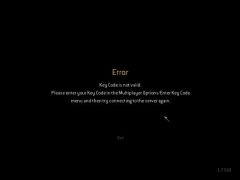
    如图:
  4. 还是间谍有趣,爬墙,暗杀。记得咱有次爬到地图外面去了,在个隐蔽地方暗杀了好几个。乖乖,七八个人跑到这地方对咱仍手雷,把咱炸的那个惨......往事不堪回首啊~~~~~~~~~~~
  5. 顶起!! 坚决支持BBG部长的黑暗统治! 打倒一切敢于反抗部长黑暗统治的JR们!
  6. 阳光猛烈,露个头。晒晒就不必了~~~~~
  7. 顶你这老鸭~
  8. 4 位用户正在查看这个主题 (1 位访客和 1 位匿名会员) 2 位会员: 老拉, RukyD 和兔子合影~~

Account

Navigation

搜索

搜索

设置浏览器推送通知

Chrome (Android)
  1. Tap the lock icon next to the address bar.
  2. Tap Permissions → Notifications.
  3. Adjust your preference.
Chrome (Desktop)
  1. Click the padlock icon in the address bar.
  2. Select Site settings.
  3. Find Notifications and adjust your preference.